Introduction
Managing Google Ads can be straightforward when you have one small campaign. Things become more complicated when you manage multiple campaigns, large keyword lists, frequent promotions, client reporting, and ongoing performance checks.
That is where advertising management tools can make a difference. But not every advertiser needs to pay for another platform.
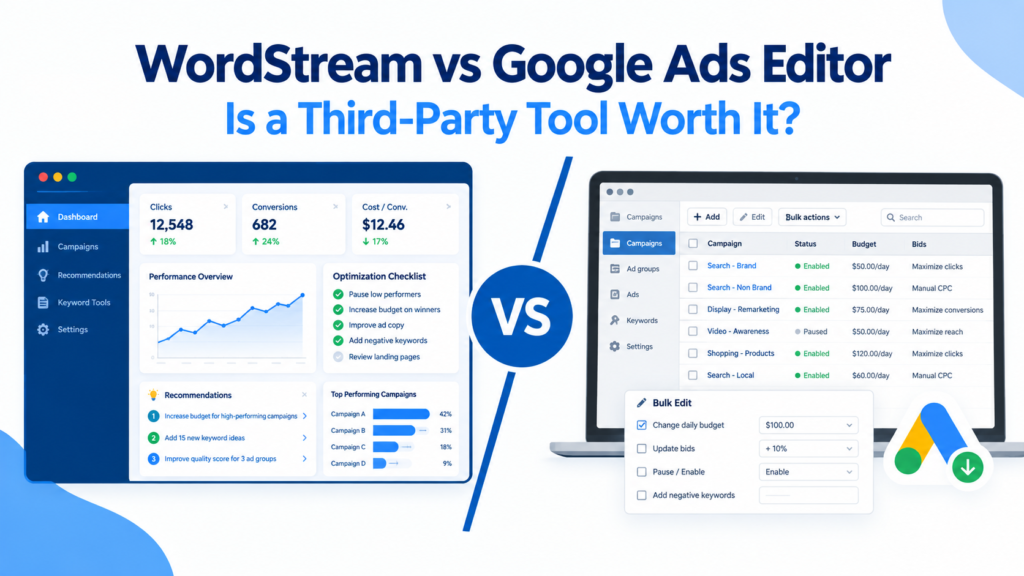
WordStream and Google Ads Editor are often compared because both can help advertisers manage campaigns more efficiently. However, they approach the job differently. WordStream focuses on guided optimization and a more assisted management workflow, while Google Ads Editor is a free desktop application designed to make campaign editing faster and easier.
So, is a third-party PPC tool worth the extra cost?
The answer depends on what slows you down. If you need guidance, structured recommendations, and a more organized optimization process, WordStream may be worth evaluating. If your main task is making precise bulk edits in Google Ads, Google Ads Editor is an excellent place to start.
In this guide, we will compare their features, benefits, limitations, costs, and ideal use cases to help you decide which option makes sense for your business.
Quick verdict: Which tool should you choose?
Choose WordStream if you want a more guided PPC workflow and the features in its current offering solve a real operational problem. It may suit small businesses and marketing teams that want help organizing optimization tasks and reviewing advertising performance.
Choose Google Ads Editor if you are comfortable managing campaigns and mainly need to create, revise, copy, organize, or review large numbers of campaign elements efficiently. It supports bulk editing, offline work, and reviewing changes before publishing, and it is free.
These tools are not perfect substitutes. Many advertisers can use Google Ads Editor for hands-on campaign changes and keep the Google Ads web interface for features that Editor does not support or that are easier to manage online.
The smartest choice is the one that solves your actual problem without adding unnecessary software costs.
1. What is WordStream?
WordStream is a digital advertising platform associated with LocaliQ. Its products and services have focused on helping businesses manage paid advertising through guided workflows, performance insights, recommendations, and reporting.
The main appeal is convenience. Instead of relying entirely on your own checklist to decide what to review, a guided tool can help organize recurring optimization tasks and highlight potential opportunities.
This can be useful for business owners who manage advertising alongside other responsibilities, or generalist marketers who do not spend all day inside Google Ads.
Key benefits of WordStream
- Guided optimization: Helps organize the process of reviewing advertising performance and identifying possible improvements.
- Performance insights: Can make campaign information easier to interpret, depending on the product and package.
- Reporting support: May help simplify reporting and recurring account reviews.
- Workflow efficiency: Can reduce some manual work if its features fit your existing process.
- Accessibility: A more guided interface may be helpful for marketers who are still developing their PPC skills.
Where WordStream may fall short
A third-party platform introduces another interface, another process to learn, and potentially another subscription.
Its recommendations also require human judgment. An automated suggestion is not automatically the right decision for a business with limited capacity, seasonal demand, low margins, or incomplete conversion tracking.
WordStream’s exact features, channel coverage, and commercial terms can vary. Before purchasing, confirm the current offering directly with the provider.
2. What is Google Ads Editor?
Google Ads Editor is Google’s free, downloadable desktop application for managing Google Ads campaigns.
You download your account data, make changes on your computer, review the proposed edits, and then post them to your live account.

Google Ads Editor is especially useful for accounts with multiple campaigns, large keyword lists, and frequent changes.
Key benefits of Google Ads Editor
- Bulk editing: Change multiple keywords, ads, budgets, or other supported settings in batches.
- Offline work: Make changes after downloading account data, even when you are not connected to the internet.
- Campaign duplication: Copy and move supported campaign elements to speed up repetitive work.
- Change review: Review proposed changes before posting them to your account.
- Time savings: Handle repetitive tasks without opening every campaign and editing each item individually.
- No software subscription: The application is free to use.
Where Google Ads Editor may fall short
Google Ads Editor is primarily an editing tool. It does not replace your PPC strategy, business reporting, or decision-making process.
Some Google Ads features and settings may be unavailable or limited in Editor. You may need the Google Ads web interface for certain campaign types, configuration options, or workflows.
You also need to understand the changes you are making. A bulk edit can save time, but an incorrect bulk edit can spread a mistake across many campaigns just as quickly.
For official information, see Google Ads Editor Help.
3. WordStream vs Google Ads Editor: Feature comparison
The most important difference is that WordStream is intended to provide a more guided advertising management experience, while Google Ads Editor concentrates on efficient campaign editing.
| Feature | WordStream | Google Ads Editor |
|---|---|---|
| Main purpose | Guided advertising management and optimization workflow | Campaign editing and bulk changes |
| Price | Paid options may apply; verify current pricing | Free |
| Bulk editing | Depends on the current product and workflow | One of its main strengths |
| Offline editing | Not its primary use case | Yes, after downloading account data |
| Optimization guidance | Guided recommendations may be available | Relies more on the advertiser’s judgment |
| Reporting | Depends on current offering and integrations | Campaign statistics and editing context |
| Learning curve | May feel more guided for some users | More operational; takes practice |
| Best suited to | Teams that need a structured workflow | Advertisers who know which changes to make |
Note: Features and packages can change. Confirm current WordStream capabilities and Google’s Editor feature-support documentation before making a purchase decision.
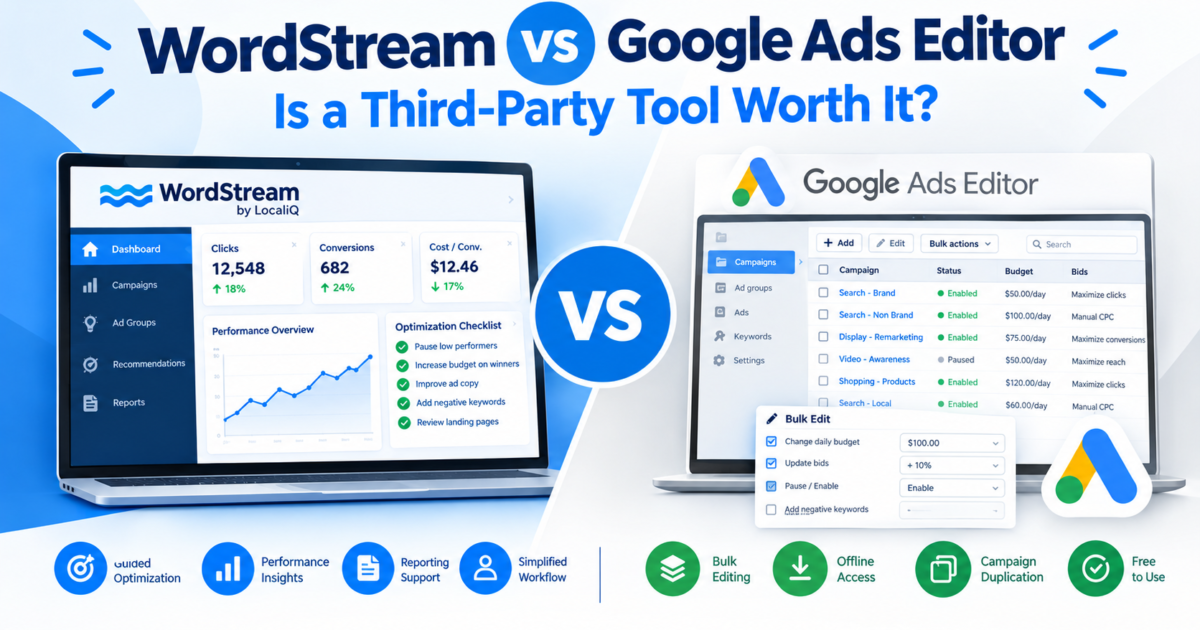
4. Visual comparison: Which tool fits your workflow?
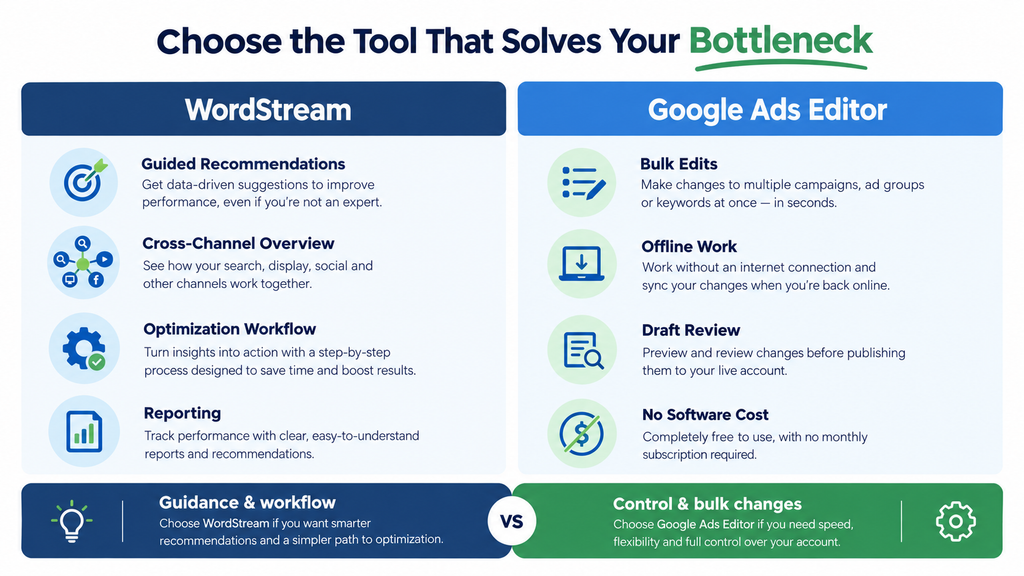
The infographic highlights the key distinction:
- WordStream: A potential fit for guided recommendations, optimization routines, and reporting workflows.
- Google Ads Editor: A strong fit for bulk changes, offline editing, and direct control over campaign updates.
Neither tool automatically guarantees better campaign performance. Your results still depend on campaign strategy, conversion tracking, landing pages, budget decisions, and the quality of your leads or sales.
5. When is WordStream worth paying for?
A third-party advertising tool is easier to justify when it saves enough time, improves decision-making, or supports work that would otherwise be missed.
WordStream may be worth evaluating if the features in its current offering address one or more of these needs.
Your team needs optimization guidance
Not every business owner or marketer knows which metrics to review first. A guided workflow may help structure recurring checks and identify potential areas for improvement.
For example, a business owner might need help reviewing search terms, identifying underperforming campaigns, or prioritizing optimization tasks rather than navigating every report manually.
Recommendations should still be checked against actual business goals before changes are made.
You want to reduce repetitive management work
If you spend hours preparing reports, organizing campaign reviews, or following the same manual process every week, a suitable third-party platform could help reduce that workload.
The important question is whether it actually saves time in your specific workflow.
You need reporting that is easier to understand
Some business owners care more about leads, sales, cost per acquisition, and return on advertising spend than technical advertising metrics.
If WordStream’s current reporting capabilities make those results easier to communicate, it may provide value beyond basic campaign editing.
However, good reporting depends on reliable tracking. A polished dashboard cannot correct inaccurate conversion data or tell you whether a lead eventually became a paying customer unless that information is tracked appropriately.
You manage advertising alongside other responsibilities
A small marketing team may not have a dedicated PPC specialist. A more guided workflow can help make recurring advertising tasks easier to organize and delegate.
Before subscribing, request a demonstration using your real workflow. Confirm supported channels, reporting exports, user access, account limits, onboarding, contract length, and cancellation terms.
6. When is Google Ads Editor enough?
For many advertisers, Google Ads Editor provides everything they need for campaign editing without requiring another subscription.
It is particularly useful when you know what changes you want to make and need to apply them accurately across many campaign elements.
Example 1: Updating multiple ads
Suppose you need to update final URLs across dozens of ads after launching a new landing page.
Instead of opening each ad individually, you can use supported bulk-editing workflows in Google Ads Editor to make the changes much more efficiently.
You should still verify that each URL points to the correct page and that tracking parameters remain intact.
Example 2: Adding negative keywords
Imagine you manage several campaigns for a plumbing company and discover irrelevant searches that are wasting advertising budget.
Google Ads Editor can help you add negative keywords across the appropriate campaigns or ad groups in batches.
The key is to apply exclusions carefully. A negative keyword added at the wrong level can prevent valuable searches from triggering your ads.
Example 3: Preparing seasonal campaigns
An ecommerce business may need to prepare campaigns for a holiday promotion, update ad copy, adjust supported settings, and organize campaign structures.
Editor can help make these changes in batches and review them before publishing.
Example 4: Managing multiple client accounts
An agency that manages several Google Ads accounts can use Editor to download account data, make changes, and handle repetitive campaign tasks more efficiently.
This is particularly useful when the team has established processes and knows exactly what needs to change.
The bottom line: If your main problem is editing campaign data rather than deciding what to optimize, Google Ads Editor is a sensible first choice.
7. Cost-benefit analysis: Is a paid tool financially worthwhile?
The best way to evaluate a third-party tool is to estimate its financial value rather than assume that paid software must be better.
Use this simple calculation:
Monthly value of time saved = Hours saved per month × Value of one working hour
Then compare that value with the subscription cost and any additional operating expenses.
For example, imagine a tool saves four hours each month and your time is worth $30 per hour.
| Item | Illustrative amount |
|---|---|
| Hours saved monthly | 4 |
| Value per hour | $30 |
| Monthly value of time saved | $120 |
| Example monthly subscription | $90 |
| Net value before other costs | $30 |
These figures are hypothetical and are not WordStream’s actual prices or a promise of savings.
If the tool saves four hours but introduces two hours of extra administration, its real benefit is smaller. If it helps your team avoid costly mistakes or complete valuable optimization work that would otherwise be missed, the value may be higher.
During a trial or evaluation period, track:
- Time spent on campaign management before and after adoption.
- Time required to prepare reports.
- Errors avoided or corrected.
- Important optimization tasks completed.
- Any measurable changes in qualified leads, sales, or acquisition costs.
Avoid attributing performance improvements to a tool unless your measurement process provides reasonable evidence that the changes contributed to those results.
8. A simple decision framework
Before choosing WordStream or Google Ads Editor, ask yourself these five questions.
Your PPC tool checklist
0 of 5My biggest problem is bulk editing or repetitive campaign changes.I need guided recommendations and a more structured optimization workflow.I need reporting that reduces manual work for my team or clients.I have confirmed which paid features I would use regularly.I can measure the time saved or other benefits of a paid tool.
Initial recommendation: Identify your biggest time-consuming task first. That will make the comparison much easier.
This checklist is a starting point, not a substitute for testing the tools against your requirements.
9. Can you use both tools together?
Yes. For some advertisers, using both is more practical than treating them as competing options.
A sensible workflow could look like this:
- Plan your strategy: Set business goals, conversion targets, budgets, and campaign priorities.
- Use Google Ads Editor: Make bulk changes, update supported campaign elements, and review edits before publishing.
- Use Google Ads online: Manage features and settings that require the web interface.
- Use a third-party tool if needed: Add WordStream if its current capabilities improve your reporting, recommendations, or recurring optimization workflow.
- Measure the results: Review qualified leads, sales, cost per acquisition, and the time spent managing the account.
For agencies, document who approves changes, how budgets are protected, and how major edits are recorded. These safeguards can be more valuable than adding another software platform.
Remember that neither tool replaces reliable conversion tracking, a clear measurement plan, or an effective lead follow-up process.
10. Common mistakes to avoid when choosing PPC software
Paying for features you do not need
A platform may offer an impressive range of features, but those features have little value if your team rarely uses them.
List your actual requirements before comparing subscriptions.
Assuming automated recommendations are always correct
Recommendations can be useful, but they may not account for your margins, sales capacity, lead quality, or seasonal business conditions.
Review each recommendation in the context of your goals.
Ignoring conversion tracking
If your tracking is inaccurate, a dashboard may give you a misleading picture of campaign performance.
Before investing in management software, ensure that important actions such as qualified leads, purchases, and phone enquiries are measured correctly.
Changing too many things at once
Bulk editing is powerful, but large simultaneous changes can make it difficult to identify why performance improved or declined.
Use a clear change log, review edits carefully, and monitor the results after publishing.
Evaluating software only by its price
Free software is not automatically the best option for every team, and paid software is not automatically more effective.
The right comparison includes time saved, functionality, reliability, training requirements, and measurable business value.
11. Frequently asked questions
Is Google Ads Editor completely free?
Yes. Google Ads Editor is a free desktop application for managing Google Ads campaigns. It is a practical starting point for advertisers who want to make bulk changes without paying for another editing tool.
Is WordStream better than Google Ads Editor?
Neither is universally better. WordStream may be more appropriate when its guided workflow, reporting, or other included features address your needs. Google Ads Editor is better suited to many direct campaign-editing tasks.
Is WordStream good for beginners?
A guided workflow may be helpful for some beginners, especially those who need a structured approach to reviewing campaigns. However, beginners still need to understand conversion tracking, keyword intent, budgets, bidding, and campaign objectives.
Can Google Ads Editor improve campaign performance?
It can help you implement changes more efficiently, but the application does not guarantee improved results. Performance depends on the quality of your strategy, targeting, advertisements, landing pages, and measurement.
Do PPC agencies need a third-party tool?
Not necessarily. Many agencies can manage campaign changes with Google Ads Editor and use reporting tools or spreadsheets for analysis. A paid platform makes sense when it solves a specific problem and provides enough value to justify its cost.
How should I compare WordStream’s pricing?
Request a current quote and check the included features, supported channels, user access, reporting, onboarding fees, contract terms, and cancellation conditions. Compare the total cost with the benefits you can realistically measure.
Can Google Ads Editor replace the Google Ads website?
No, not completely. Some features and settings are unavailable or limited in Editor, so you should retain access to the Google Ads web interface for the tasks that require it.
Conclusion: Is a third-party PPC tool worth it?
WordStream can be worth paying for when its current features provide useful guidance, save meaningful time, or simplify reporting and recurring optimization tasks. It is less compelling if you only need to make bulk changes in Google Ads and already know what needs to be done.
Google Ads Editor is the sensible first choice for advertisers who need a free, powerful way to manage campaign changes at scale. Learning its workflow can save time, reduce repetitive work, and make account maintenance more manageable.
For many businesses, the best approach is to start with Google Ads Editor, identify the tasks it does not solve, and then evaluate whether a paid platform fills that gap.
The final recommendation is simple: pay for a third-party tool to solve a specific workflow problem, not simply because managing ads feels complicated. Start with the tools available for free, measure the limitations of your current process, and let the value you can demonstrate guide your decision.