Introduction
If you’ve ever searched for a “free CRM,” HubSpot was probably the first name you saw. It’s one of the most popular customer relationship management platforms for small and mid-sized businesses. But the gap between the free plan and the paid tiers is large, and many buyers only discover that after they’ve loaded in their data.
This review covers what you get for free, what each paid plan adds, what it really costs, and who should upgrade.
What Is HubSpot CRM?
HubSpot CRM is a cloud-based platform for managing contacts, companies, deals and customer conversations in one place. It sits at the center of HubSpot’s wider suite: Marketing Hub, Sales Hub, Service Hub, Content Hub and Operations Hub. You can use the CRM alone or add “Hubs” as your needs grow.
[Image suggestion: HubSpot CRM deals pipeline dashboard screenshot. Use your own screenshot or a licensed image.]
HubSpot Free CRM: What You Actually Get
The free plan isn’t a trial. HubSpot states it has no expiration date, so nothing ends if you stay on Free. Reviewers also report it covers unlimited users, though the contact limit varies by source (some say 1,000, others up to 1 million), so check HubSpot’s current terms before you plan around either number.
Typically included on the free plan:
- Contact, company and deal management
- A visual drag-and-drop deals pipeline
- Email tracking and basic email templates
- Meeting scheduling links and live chat
- Basic reporting dashboards
- Integrations with Gmail and Outlook
Where the free plan falls short:
- HubSpot branding on emails and forms
- Very limited automation
- Basic reporting with no custom reports
- No sales forecasting
- Capped usage on calling, sequences and AI credits
For freelancers, startups and small teams, the free plan is one of the strongest on the market. One review calls it more capable than the free tiers from Salesforce or Pipedrive.
HubSpot Paid Plans: Starter, Professional and Enterprise
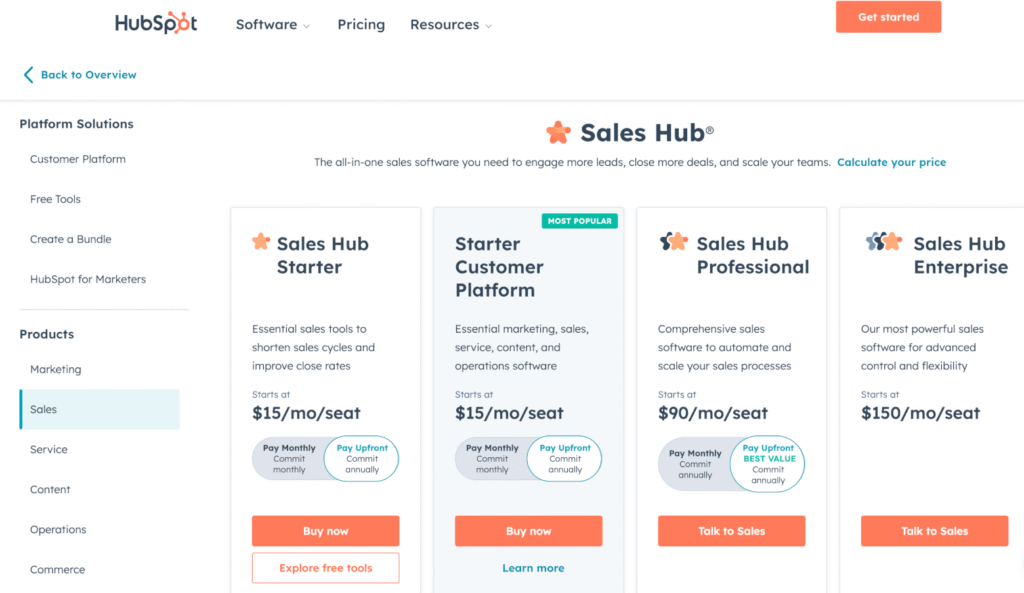
Each HubSpot product comes in four tiers: Free, Starter, Professional and Enterprise. Here is how they compare for Sales Hub, the product most CRM buyers end up evaluating.
| Plan | Approx. Price (per seat/month) | Best For | Key Additions |
|---|---|---|---|
| Free | $0 | Solo users, tiny teams | Core CRM, pipeline, email tracking |
| Starter | ~$15–$20 | Small teams | Removes HubSpot branding, adds calling, templates, simple automation |
| Professional | ~$90–$100 | Growing sales teams | Workflows, sequences, forecasting, custom reports |
| Enterprise | ~$150 | Large organizations | Advanced permissions, predictive tools, custom objects |
One source lists Starter at $20, Professional at $100 and Enterprise at $150 per user per month. Another notes that Starter costs $15 per seat on annual billing, or $20 month-to-month.

HubSpot Starter: The “Remove the Branding” Tier
Starter is cheap and removes HubSpot’s branding. Reviewers describe it as a tier that adds calling (500 minutes), email templates and basic automation. It’s good for getting started, but it is not a powerful automation tool.
HubSpot Professional: Where the Real Power (and Cost) Lives
Professional is where HubSpot makes its money. One analysis argues that the features forcing the jump (real marketing automation, omni-channel campaigns, custom reporting) are exactly the ones growing teams need. The price jump is steep. Per seat, it can be several times higher than Starter.
HubSpot Enterprise: Built for Scale
Enterprise adds advanced permissions, custom objects, predictive scoring, and hierarchical teams. It is aimed at larger organizations with complex sales operations, and it typically requires an annual contract.
The Hidden Costs Most Reviews Skip
HubSpot’s pricing page shows the plan prices, not your final bill. Watch for these:
- Mandatory onboarding fees. Professional and Enterprise plans carry a one-time onboarding fee, commonly reported at around $3,000 for Professional and $6,000–$7,000 for Enterprise. One source says these fees aren’t disclosed until checkout.
- Annual contracts. Professional and Enterprise generally require annual commitments.
- Marketing contact tiers. If you add Marketing Hub, pricing depends on the number of marketing contacts, with additional contacts costing extra.
- Credits and usage limits. AI features (Breeze) run on metered credits, so heavy usage can add cost.
- Seat costs. Extra seats on higher tiers add up quickly, so a 5-person team costs much more than a 2-person one.
Marketing Hub Professional, for example, starts around $890 per month with 3 seats, and Enterprise around $3,600 per month. A bundled Professional “Customer Platform” is reported at roughly $1,300 per month for 5 seats.
Tip: HubSpot pricing is negotiable at the Professional and Enterprise levels, and nonprofits can get discounts of around 40%.
Pros and Cons of HubSpot CRM
Pros
- A genuinely useful free plan with no time limit
- Clean, beginner-friendly interface
- Large app marketplace and strong integrations
- Smooth upgrade path as your business grows
- Excellent educational resources and community
Cons
- Steep price jump from Starter to Professional
- Onboarding fees and annual contracts at higher tiers
- Costs rise quickly with seats and contacts
- Free and Starter lack serious automation
- Pricing structure is complex
Free vs Paid: Which Plan Should You Choose?
Stay on Free if: you’re a freelancer, solopreneur or very small team that needs organized contacts, a simple pipeline and basic email tracking.
Choose Starter if: you want to remove HubSpot branding, make calls from the CRM, and use basic templates without a big budget.
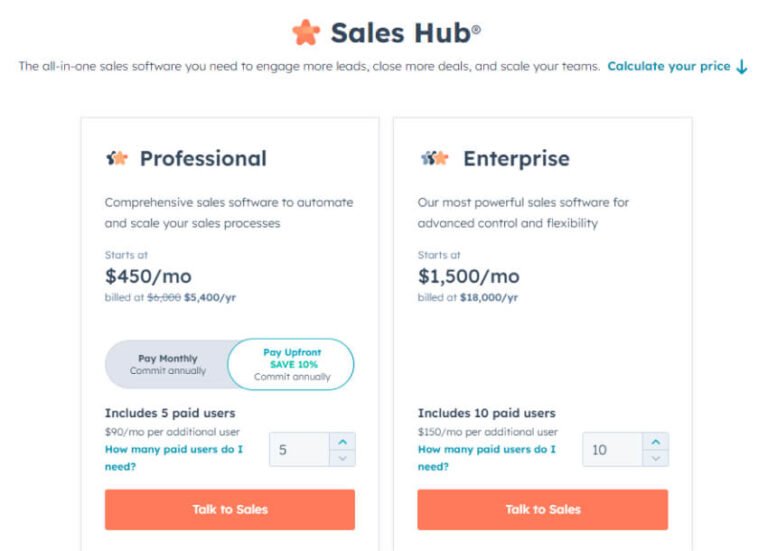
Upgrade to Professional if: you need automated workflows, sequences, forecasting and custom reports, and you have a team large enough to justify the per-seat and onboarding cost.
Consider Enterprise if: you’re a large organization needing advanced permissions, custom objects and sophisticated reporting.
HubSpot Alternatives Worth Considering
If Professional pricing feels out of reach, compare Pipedrive (sales-focused and simpler), Zoho CRM (lower cost, highly customizable), Close (flat-rate, built for outbound teams), and Salesforce (the enterprise standard, with Starter at roughly $25 per user per month).
Another approach is to keep HubSpot’s free or Starter CRM as your system of record and add automation through an integration platform, rather than buying Professional.
Final Verdict
HubSpot CRM earns its reputation. The free plan is excellent for getting started, and Starter is affordable. The challenge is the leap to Professional, where costs jump sharply once you add seats, onboarding fees and annual contracts. If you grow into the features Professional offers, it can be worth it. If you only need a tidy contact database, the free plan may serve you well for a long time.
Rating: 4.4/5. Excellent value on Free and Starter, with pricing complexity at higher tiers.
FAQ
Is HubSpot CRM really free? Yes. The free CRM has no expiration date and supports unlimited users.
How much does HubSpot cost per month? Free to roughly $150 per seat for Sales Hub Enterprise, with bundles and Marketing Hub tiers costing considerably more.
Is there an onboarding fee? Yes, on Professional and Enterprise plans.
Can I upgrade or downgrade later? You can upgrade easily, but downgrading may be limited by your contract term.
Publishing Notes
HubSpot changes its pricing often, and the sources I found disagreed on some figures (for example, free-plan contact limits and Starter pricing). Verify every number against hubspot.com/pricing before publishing. Replace the image suggestions with your own screenshots or licensed images.