Every successful SEO strategy starts with one question: what are people actually searching for? Guess wrong and you can spend months writing content nobody looks for. Guess right and you build a steady stream of qualified traffic.
Keyword research tools take the guesswork out. They show you search volume, how hard it is to rank, what searchers actually want, and what your competitors already rank for.
This guide covers the best free and paid keyword research tools available in 2026, who each one suits, and how to choose.
What Is a Keyword Research Tool?
A keyword research tool is software that helps you discover and evaluate the search terms people type into Google and other search engines. Most tools provide:
- Search volume: roughly how many times a term is searched per month
- Keyword difficulty (KD): an estimate of how hard it is to rank on page one
- Search intent: whether people want information, a product, a comparison, or a specific site
- Related keywords and questions: variations and long-tail ideas
- SERP features: featured snippets, “People Also Ask,” video carousels and so on
- Competitor data: which keywords rival sites rank for
Why Keyword Research Tools Matter
- They reveal real demand. You see what your audience searches for, not what you assume.
- They save time. Competitor analysis and keyword clustering that took days now takes minutes.
- They prioritize effort. You can target winnable keywords instead of fighting for impossible ones.
- They uncover content gaps. You find topics competitors rank for that you’ve missed.
- They improve ROI. Content built around proven demand is far more likely to pay off.
Quick Comparison Table
| Tool | Type | Starting Price* | Best For |
|---|---|---|---|
| Google Keyword Planner | Free | Free | Search demand data straight from Google |
| Google Search Console | Free | Free | Finding keywords your site already ranks for |
| Google Trends | Free | Free | Seasonality and trending topics |
| AnswerThePublic | Freemium | Free tier | Question-based keywords |
| Ubersuggest | Freemium | Free tier / paid plans | Beginners and small businesses |
| Semrush | Paid | Roughly $130/mo | All-in-one SEO and competitive research |
| Ahrefs | Paid | Roughly $29–$129/mo | Competitor and backlink-driven research |
| Moz Keyword Explorer | Paid | Varies | Simple, decision-friendly scoring |
| Mangools (KWFinder) | Paid | From about $29/mo (annual) | Budget-friendly, easy interface |
| Serpstat | Paid | Around $65/mo | Keyword clustering at scale |
*Prices change often and vary by billing cycle and region. Always confirm on each vendor’s website before buying.
Best Free Keyword Research Tools
1. Google Keyword Planner
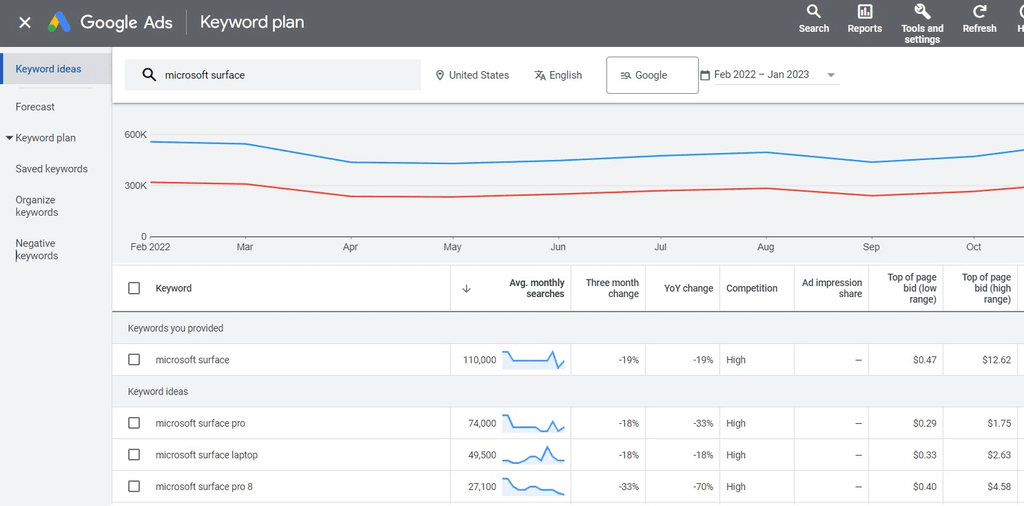
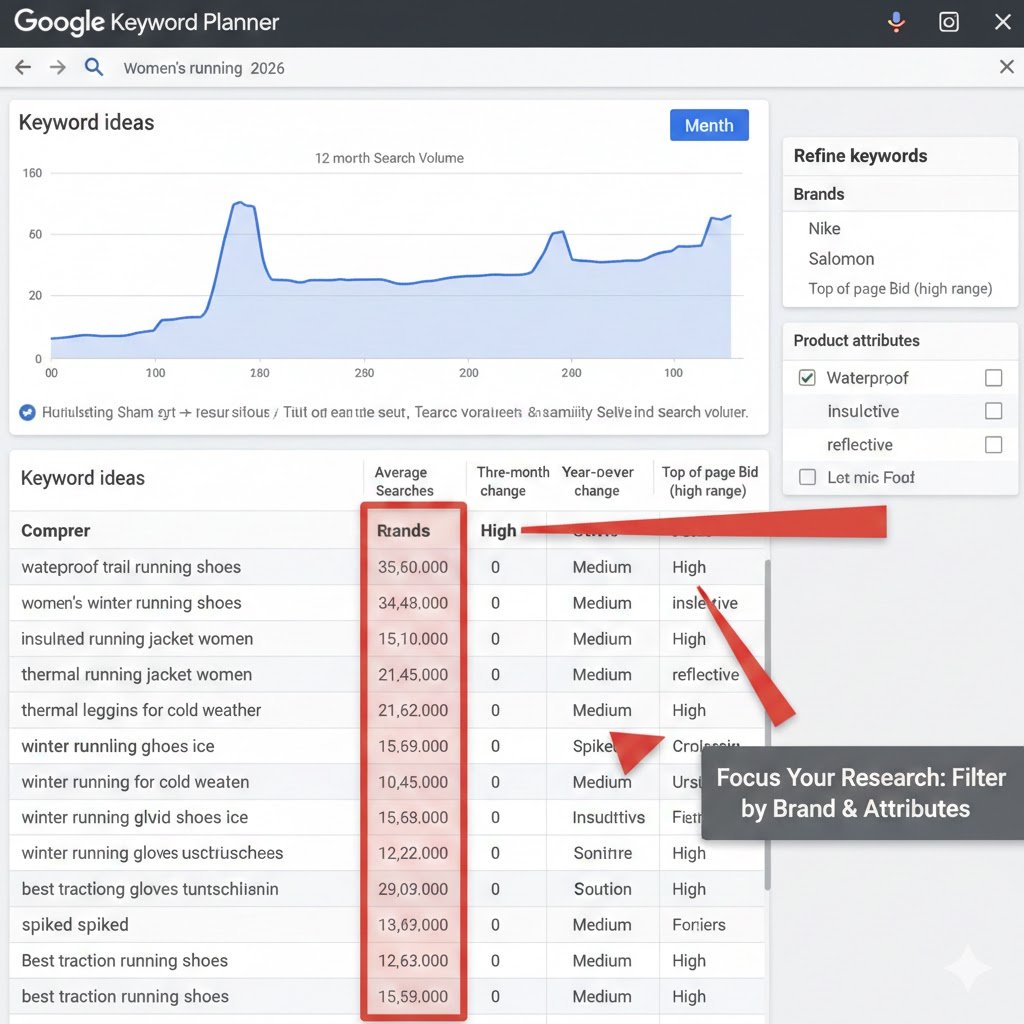
Google Keyword Planner is Google’s own tool, built into Google Ads. It’s free to use, and it shows data from the world’s largest search engine.
Pros
- Free, with data directly from Google
- Great for validating demand and checking commercial intent
- Shows forecasts and bid estimates
Cons
- Search volumes appear as broad ranges unless you run active ad campaigns
- Built for advertisers, so organic SEO insights are limited
- Requires a Google Ads account
Best for: beginners and anyone validating a keyword idea quickly.
2. Google Search Console
Search Console is the most underrated keyword tool. It shows the actual queries your site already appears for, along with impressions, clicks and average position.

Pros
- 100% accurate data for your own site
- Reveals “almost ranking” keywords (positions 8 to 20) that are easy wins
- Completely free
Cons
- Only shows queries you already get impressions for
- Doesn’t show search volume or difficulty
Best for: improving existing content and finding quick optimization wins.
3. Google Trends
Google Trends shows how interest in a topic changes over time and across regions. It’s valuable for spotting seasonality and comparing terms.
Pros
- Reveals rising and declining topics
- Lets you compare keywords side by side
- Free and regionally detailed
Cons
- Shows relative interest, not exact search volume
Best for: content calendars, seasonal planning and picking between competing terms.
4. AnswerThePublic
AnswerThePublic turns a seed keyword into a visual map of questions, comparisons and prepositions people search for.
Pros
- Excellent for FAQ sections, blog topics and featured snippet targeting
- Visual and easy to understand
Cons
- Free searches are limited per day
- Offers limited volume and difficulty data
Best for: question-based and long-tail content ideas.
5. Ubersuggest
Ubersuggest, created by Neil Patel, is a beginner-friendly tool covering keyword ideas, content ideas and basic competitor analysis, with a limited free tier.
Pros
- Simple interface
- Affordable compared to enterprise suites
- Good keyword and content idea suggestions
Cons
- Smaller database than Semrush or Ahrefs
- Free usage is capped
Best for: small businesses, bloggers and anyone new to SEO.
6. Other Free Options Worth Trying
- Google autocomplete and “People Also Ask”: instant, free long-tail ideas straight from the SERP
- Keyword Surfer and similar browser extensions: show volumes right in Google results
- Reddit, Quora and forums: raw audience language and real pain points
- Free tiers of paid tools: Semrush and others let you run a limited number of searches each day
Best Paid Keyword Research Tools
1. Semrush
Semrush is the all-in-one choice for marketers who want keyword research, competitor analysis, site audits, rank tracking and content tools under one roof. Its Keyword Magic Tool draws on a database of billions of keywords and groups results into clusters with intent labels.
Pros
- Huge keyword database and strong competitor insights
- Intent labels, SERP features and keyword grouping
- Broad toolkit beyond keyword research
Cons
- Higher price point
- The number of features can overwhelm beginners
Best for: agencies, growing businesses and marketers who need a full SEO suite.
2. Ahrefs
Ahrefs is known for its backlink index and competitor research. Its Keywords Explorer provides accurate difficulty scores, parent topics, traffic potential estimates and click data.
Pros
- Excellent competitor and “Content Gap” analysis
- Useful metrics like traffic potential and clicks
- Clean, fast interface
Cons
- Credit-based usage on lower plans can add up
- Fewer content-writing tools than Semrush
Best for: SEOs who want deep competitor and link-based insights.
3. Moz Keyword Explorer
Moz is a veteran in the SEO world, and its Keyword Explorer favors simplicity with clear scores for volume, difficulty and priority.
Pros
- Easy-to-read metrics and keyword lists
- Beginner-friendly learning resources
Cons
- Smaller database, so niche or non-English markets may have fewer ideas
Best for: small teams that want straightforward, decision-ready data.
4. Mangools (KWFinder)
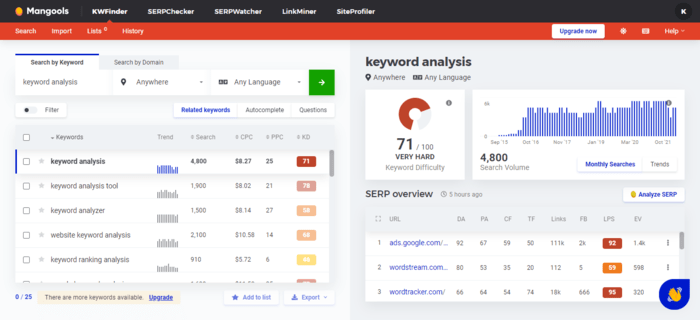
Mangools is a budget-friendly suite whose KWFinder tool is popular for finding low-competition, long-tail keywords.
Pros
- Affordable and very easy to use
- Great for local and long-tail research
Cons
- Smaller database than the big two
Best for: freelancers, bloggers and small sites.
5. Serpstat
Serpstat combines SEO and PPC research, and its keyword clustering feature is handy for planning content at scale.
Pros
- Strong clustering and all-in-one features at a mid-range price
Cons
- Interface and data depth trail the market leaders
Best for: teams planning large content libraries on a moderate budget.
Free vs. Paid: Which Should You Choose?
| Factor | Free Tools | Paid Tools |
|---|---|---|
| Cost | $0 | Typically $30 to several hundred dollars per month |
| Data depth | Limited, often ranges or relative values | Detailed metrics and large databases |
| Competitor analysis | Minimal | Extensive |
| Rank tracking | Rare | Usually included |
| Daily limits | Common | Higher or unlimited |
| Best for | Beginners, small sites, validation | Growth-focused teams and agencies |
Our recommendation: start with Google Keyword Planner, Search Console and Google Trends. When you outgrow them (usually when you need competitor data or reliable difficulty scores), add one paid tool rather than several.
How to Choose the Right Tool
Ask yourself:
- What’s my budget? Don’t pay for features you won’t use.
- What’s my experience level? Beginners do better with simple interfaces.
- What do I need most? Competitor research favors Ahrefs or Semrush, long-tail research favors Mangools, and question ideas favor AnswerThePublic.
- Which markets am I targeting? Check that the tool’s database covers your country and language.
- Do I need other SEO features? An all-in-one suite may save money over several separate tools.
Step-by-Step: How to Do Keyword Research
- List seed keywords: broad topics related to your business.
- Expand them: use a tool to generate related terms and questions.
- Check metrics: compare volume, difficulty and traffic potential.
- Analyze search intent: read the top results to see what Google rewards (guides, products, comparisons).
- Study competitors: find keywords they rank for that you don’t.
- Prioritize: pick keywords with good relevance, reasonable difficulty and business value.
- Group into clusters: map related keywords to one page each.
- Track and refine: monitor rankings and update content over time.
Common Keyword Research Mistakes
- Chasing volume alone: a keyword with 200 monthly searches and high buyer intent can beat one with 20,000 vague searches.
- Ignoring search intent: ranking is hard if your page type doesn’t match what Google shows.
- Targeting only head terms: long-tail keywords convert better and are easier to win.
- Trusting one tool blindly: volume and difficulty are estimates. Cross-check when the decision matters.
- Researching once and stopping: search behavior changes, so revisit your keyword list regularly.
Frequently Asked Questions
What is the best free keyword research tool?
Google Keyword Planner is the best starting point for search demand data, with Google Search Console as the best source for keywords your site already ranks for.
Is Semrush or Ahrefs better for keyword research?
Both are excellent. Semrush offers a broader toolkit with strong keyword grouping and content features, while Ahrefs is favored for competitor research and metrics like traffic potential. A trial of each is the best way to decide.
Do I really need a paid keyword research tool?
Not always. Small sites can go far with free tools. Paid tools become worthwhile when you need accurate difficulty scores, competitor analysis and rank tracking.
How accurate are keyword volumes?
They’re estimates, and different tools often report different numbers. Use them to compare keywords relative to each other rather than treating them as exact figures.
How often should I do keyword research?
Review your keyword strategy at least quarterly, and whenever you plan a new content campaign.
Final Thoughts
The best keyword research tool is the one that fits your goals and budget. Beginners should start with Google’s free tools, add AnswerThePublic or Ubersuggest for ideas, and move to Semrush, Ahrefs or Mangools once the business needs deeper data. Whichever you choose, pair the numbers with a close read of search intent, and your content will target what people truly want.