Introduction
Every successful SEO strategy starts with one question: what are people actually searching for? Keyword research answers it. It shows you the exact words and phrases your audience types into Google, how many people search for them, and how hard it is to rank for them.
Doing this by guesswork is slow and unreliable. Keyword research tools take the guesswork out by providing search volume, keyword difficulty, trends, competitor insights, and related ideas in seconds. Some are completely free, while others are powerful paid platforms built for agencies and enterprise teams.
This guide covers the best keyword research tools in both categories, what each does well, and how to choose the right one.
What Is a Keyword Research Tool?
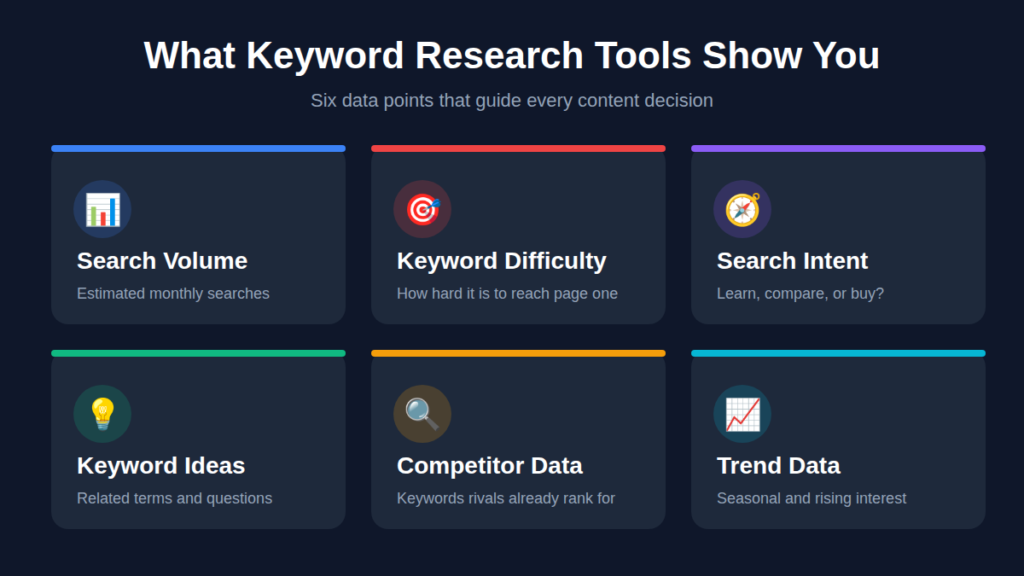
A keyword research tool is software that helps you discover, analyze, and prioritize the search terms relevant to your website or business. Most tools provide some combination of:
- Search volume: the estimated number of monthly searches
- Keyword difficulty (KD): how competitive it is to rank on page one
- Search intent: whether users want to learn, compare, or buy
- Keyword suggestions: related terms, questions, and long-tail variations
- Competitor data: the keywords rival sites already rank for
- Trend data: seasonal patterns and rising or falling interest
Best Free Keyword Research Tools
1. Google Keyword Planner
Built into Google Ads, Keyword Planner is the classic starting point. It offers keyword ideas, search volume ranges, and competition data straight from Google. It was designed for advertisers, so volume is often shown as broad ranges unless you run active campaigns. Still, it’s a reliable source for discovering ideas and gauging commercial interest.
Best for: Beginners and anyone planning paid and organic campaigns together.
2. Google Search Console
Search Console shows the queries your site already appears for, along with impressions, clicks, average position, and click-through rate. This is real performance data, which makes it ideal for finding “almost ranking” keywords (positions 8 to 20) that a small content update could push onto page one.
Best for: Optimizing existing content and finding quick wins.
3. Google Trends
Trends compares the relative popularity of search terms over time and by region. It won’t give exact volumes, but it shows whether a topic is growing, declining, or seasonal, which is useful for timing content.
Best for: Seasonal planning and validating topic demand.
4. Google Autocomplete and “People Also Ask”
The suggestions that appear as you type, along with the “People Also Ask” boxes and related searches at the bottom of results pages, reflect real user behavior. They cost nothing and are excellent sources of long-tail and question-based keywords.
Best for: Finding natural, conversational long-tail phrases.
5. AnswerThePublic
This tool visualizes the questions, prepositions, and comparisons people search around a seed keyword (“what,” “how,” “vs,” “for”). It’s especially helpful for blog topics and FAQ content. The free tier has daily search limits.
Best for: Content ideation and FAQ research.
6. Ubersuggest
Created by Neil Patel, Ubersuggest provides keyword ideas, volume, difficulty, and content suggestions with a limited number of free daily searches. The interface is simple and approachable.
Best for: Small businesses and new bloggers.
7. Keyword Surfer and Keywords Everywhere (Browser Extensions)
These extensions display search volume and related keywords directly in Google’s results. Keyword Surfer has a free tier, while Keywords Everywhere has historically used a low-cost credit-based model. Check each tool’s current terms before relying on it.
Best for: Quick on-the-fly research while browsing results.
8. AlsoAsked
AlsoAsked maps the “People Also Ask” question trees behind a topic, helping you structure content around the follow-up questions users have. Free usage is limited.
Best for: Building topic clusters and content outlines.
Best Paid Keyword Research Tools
1. Semrush
Semrush is an all-in-one SEO platform with one of the largest keyword databases available. Its Keyword Magic Tool generates huge lists of ideas and filters them by volume, difficulty, intent, and SERP features. It also includes competitor gap analysis, position tracking, site audits, and content tools.
Strengths: Huge database, strong competitor research, excellent intent filters.
Considerations: The learning curve and price can be steep for beginners.
2. Ahrefs
Ahrefs is known for its extensive backlink data and its Keywords Explorer, which provides accurate difficulty scores, clicks data (not just volume), and parent topic grouping. Its Content Gap and Site Explorer tools make competitor analysis straightforward.
Strengths: Reliable difficulty metrics, clicks and traffic potential data, excellent interface.
Considerations: Premium pricing, and limits on reports at lower tiers.
3. Moz Keyword Explorer
Moz offers clear keyword metrics, including its “priority” score that blends volume, difficulty, and organic click-through potential. It’s known for beginner-friendly design and solid educational resources.
Strengths: Easy to understand, helpful prioritization score.
Considerations: A smaller database than Semrush or Ahrefs.
4. SE Ranking
SE Ranking combines keyword research, rank tracking, site audits, and competitor analysis at a more moderate price than the biggest names. It’s popular with freelancers and small agencies.
Strengths: Strong value, flexible plans, solid rank tracking.
Considerations: Fewer advanced features than enterprise platforms.
5. KWFinder (by Mangools)
KWFinder is built specifically for finding low-competition keywords. Its clean interface, local keyword support, and straightforward difficulty scores make it a favorite among bloggers and niche site builders.
Strengths: Simple, affordable, great for long-tail discovery.
Considerations: Less comprehensive for large-scale competitor analysis.
6. Surfer SEO
Surfer focuses on pairing keyword research with on-page optimization. It analyzes top-ranking pages and recommends terms, headings, and content length, making it a strong choice for content teams.
Strengths: Content optimization guidance, keyword clustering.
Considerations: More of a content tool than a standalone research database.
7. Serpstat
Serpstat is a budget-friendly all-in-one platform with keyword research, clustering, and competitor analysis, often chosen by teams who want broad features at a lower cost.
Strengths: Affordable, wide feature set.
Considerations: Interface and data depth vary compared with market leaders.
Free vs. Paid Keyword Research Tools
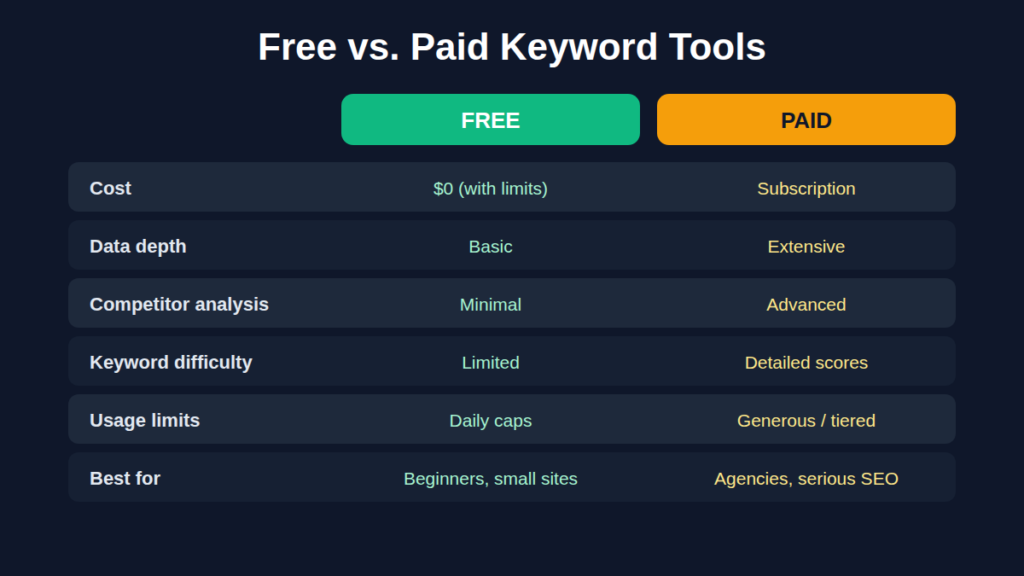
| Factor | Free Tools | Paid Tools |
|---|---|---|
| Cost | $0 (some with limits) | Monthly or annual subscription |
| Data depth | Basic or limited | Extensive, with filters and history |
| Competitor analysis | Minimal | Advanced |
| Keyword difficulty | Often unavailable or basic | Detailed scoring |
| Usage limits | Daily or monthly caps | Generous or tiered |
| Best for | Beginners, small sites | Agencies, growing businesses, serious SEO |
Pricing and plan limits change frequently, so always check each provider’s official site for current details and free trial options.
How to Choose the Right Tool
Start with your goal. If you’re blogging as a hobby, free tools combined with Search Console may be enough. If SEO drives revenue, a paid platform pays for itself through better targeting and time savings.
Consider your experience level. Beginners benefit from simple interfaces like Ubersuggest, KWFinder, or Moz. Experienced marketers will get more from Semrush or Ahrefs.
Check data accuracy for your market. Volumes differ between tools, so test a few seed keywords in a free trial and compare results for your country and language.
Look at the whole workflow. If you also need rank tracking, audits, and backlink analysis, an all-in-one suite is more efficient than juggling separate tools.
Pro Tips for Better Keyword Research
- Prioritize search intent. A keyword with modest volume and clear buying intent often beats a high-volume term with vague intent.
- Target long-tail keywords. Longer, specific phrases are less competitive and convert better.
- Combine tools. Use Search Console for what you already rank for, a free tool for ideas, and a paid tool for validation and competitor gaps.
- Group keywords into topic clusters. Build a pillar page supported by related articles to establish topical authority.
- Review the actual search results. Before committing to a keyword, look at who ranks. If the results are dominated by huge brands, consider an easier angle.
- Revisit regularly. Search behavior changes, so update your keyword lists every few months.
Conclusion
There is no single best keyword research tool, only the best fit for your goals and budget. Free options like Google Keyword Planner, Search Console, and Google Trends give you a solid foundation. When you’re ready to scale, paid platforms like Semrush, Ahrefs, SE Ranking, and KWFinder add the depth, accuracy, and competitor insight that speed up growth.
Start with free tools, learn what data matters for your site, and upgrade when your needs outgrow them. Good keyword research doesn’t just bring more traffic. It brings the right traffic.
FAQs
What is the best free keyword research tool?
Google Keyword Planner and Google Search Console are the most trusted free options, since they use Google’s own data.
Is Semrush or Ahrefs better for keyword research?
Both are excellent. Semrush is often preferred for its large keyword database and intent filters, while Ahrefs is praised for accurate difficulty scores and clicks data. A free trial or demo is the best way to compare them for your niche.
Do I need a paid tool to rank on Google?
No. Paid tools save time and add depth, but many sites rank well using free tools and strong content.
How often should I do keyword research?
At minimum, review your strategy quarterly, and run fresh research before launching any new content campaign.